An offline business card scanner for unreliable connections
CardAction reads business cards on your phone, so you can capture and review contacts when venue Wi-Fi fails or you have no mobile signal. Google Sheets exports, webhooks and online messages need a connection.
Start with 3 free scans a day. See plans and feature limits.
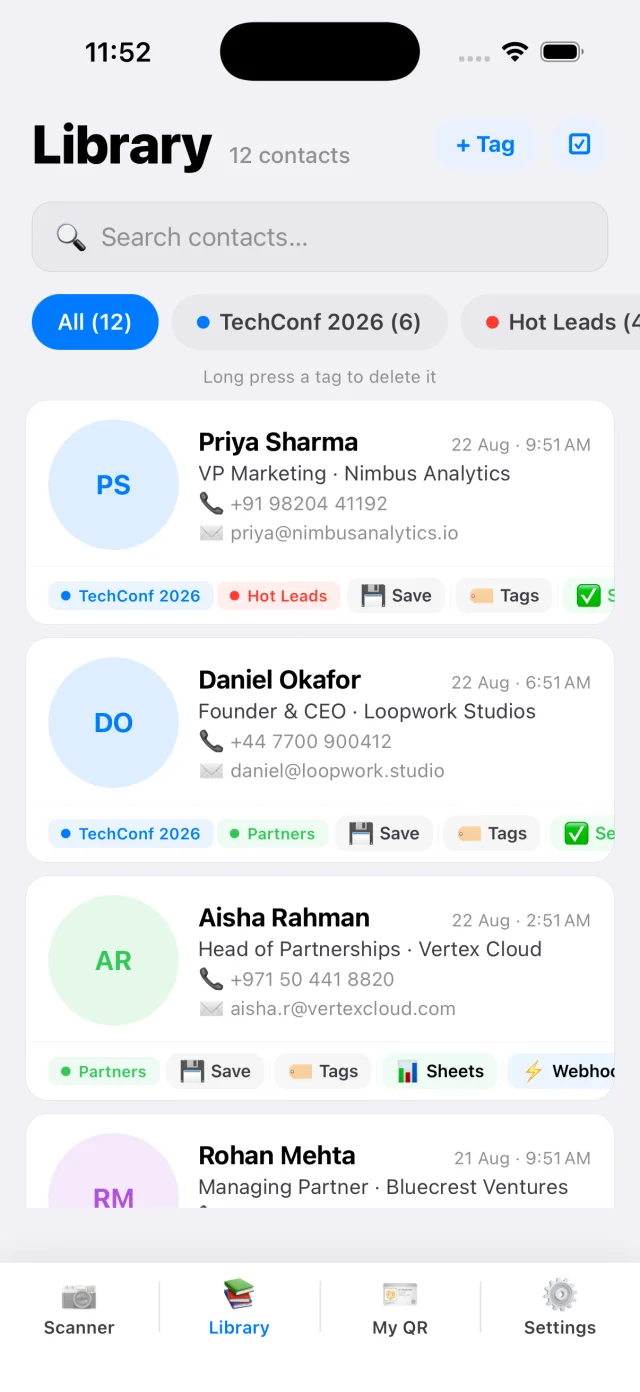
Prepare before losing signal
Install CardAction while you have internet, open it and allow camera access. Scan a card you can check against the original. If you want to save contacts to your phone’s address book, test that permission too.
Decide how many cards you expect to collect and check the free and Pro limits. An offline workflow still uses the app’s scan allowance. Set up event tags and any integrations before you leave so you can test them while help and a connection are available.
If you want to keep conversation notes inside CardAction, enable Custom Note under Settings, Automations before the event. This setting requires Pro and is off by default. When it is enabled, fill in the note in Verify & Edit before completing each scan. You can keep a separate follow-up list if you do not use this feature.
Try a short rehearsal: turn off Wi-Fi and mobile data, scan a business card, correct a field and find the saved entry in the library. Then reconnect. This tells you more about your own phone and setup than a feature list does.
Capture cards offline
- Place the card in good light with all its edges visible.
- Scan the card. Text recognition happens on the phone.
- Compare the name, phone and email with the printed card, correcting any errors.
- Select the event tag and, if Custom Note is enabled, enter the required note before finishing the contact.
- Open the library and confirm the contact is there before moving on.
At a busy exhibition, the note can be as simple as “Asked for the product sheet after the show.” That gives you a reason to follow up when a connection returns. Avoid adding confidential details you do not need.
Keep the physical card until you have checked the saved entry. If the back contains another number or email, use both-side capture so the information stays together.
Know what needs a connection
| Task | Connection needed? |
|---|---|
| Read text from a business card | No; OCR runs on the device. |
| Review saved contacts and add local notes | No. |
| Create a local CSV or vCard export | No; sharing through a cloud service may need internet. |
| Send a row to Google Sheets or a webhook | Yes. |
| Deliver a WhatsApp message or email | Yes. |
Your phone’s ability to place a call or send an SMS depends on its mobile service. The scanner does not provide a connection for other apps.
Check exports after reconnecting
Open CardAction when you have a stable connection. Check the export status of contacts that should have reached Google Sheets or your webhook. The app can retry failed exports, but a disconnected Google account or a rejected webhook request needs attention.
Look at the destination too. Confirm a recent contact appears with the right name and phone number before sending your follow-up list to colleagues. If you retry manually, check for duplicates in the receiving sheet or CRM.
When you only need a spreadsheet after the event, a CSV export for Excel avoids needing live delivery during the show. If you need colleagues to see contacts as they arrive, configure and test Google Sheets export ahead of time, then allow for delays when the connection drops.
Common questions
Can CardAction scan business cards without internet?
Yes. OCR runs on the device, and the contact library is stored locally. Install and open the app before an event and test your workflow before going offline.
Will Google Sheets work while I am offline?
Sending a row to Google requires internet. Failed exports can be queued for retry. Reconnect, reopen CardAction and check the export status and the destination spreadsheet before assuming a row arrived.
Can I use WhatsApp after scanning offline?
You can capture the contact offline. Delivering a WhatsApp message needs an internet connection and a phone number that uses WhatsApp. Review the recipient and message before sending.
Does offline scanning mean all app features keep data on my phone?
Offline OCR and local storage keep scanned contacts on the device. Optional Google Sheets exports, webhooks, messaging and Wallet features have their own data flows, explained in CardAction's privacy policy.